Horn of the Abyss (HotA) download

Horn of the Abyss (HotA) is a meticulously crafted fan-made expansion for Heroes of Might and Magic III, designed to seamlessly integrate with the original game’s mechanics and aesthetics. Developed by HotA Crew, this expansion introduces new content that honors the legacy of the original while enhancing gameplay depth and variety.
| Platform | Heroes 3 Complete |
| Version | 1.8.1 |
| File Size | 317 MB |
| Update | 26.08.2026 |
| Authors | HotA crew |
| Status | active |
| Download (official, moddb.com) | |
| Download (alternative download, WoG Folder) | |
| Heroes 3 Complete GOG version (works only with this version) | |
| How to install Heroes 3 HotA step-by-step | |
| ⚙️WoG Folder is online source of HoMM mods I’ve discovered over the past decade. It’s regularly updated, and all mods are neatly organized. The WoG Folder also contains various goodies like the “Did you know?“ series, artworks, manuals, meme collections, and more. | |
The Bulwark town and faction have been added, including new heroes, creatures and their dwellings, as well as the Runes faction-specific skill.

Bulwark town
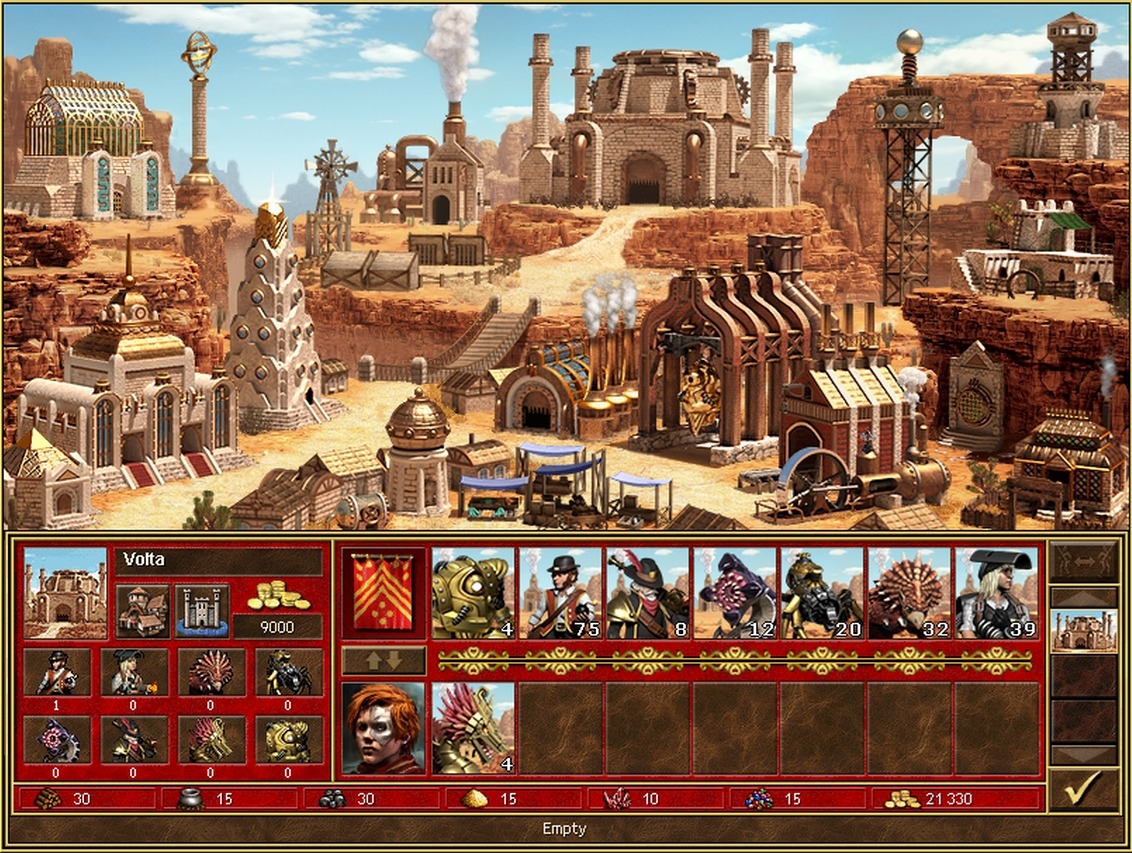
Factory town
[!] — Important Information.
[-] — Bug and error fixes and changes to previous elements.
[+] — Innovations.
Horn of the Abyss (HotA) v1.8.0 changelog:
[!] The Bulwark town and faction have been added, including new heroes, creatures and their dwellings, as well as the Runes faction-specific skill.
[!] The extended event system has been added: a new feature of the scenario editor that allows creating events and tasks with intricate conditions.
[!] This update does not yet feature the Bulwark campaign. Expect it to be released in the next updates.
HotA Bugs
[-] Fixed a possible crash when a creature casts a spell when Automatons are present in combat
[-] Fixed a possible repeat entry to the Hermit’s Shack in case of an increase in the Learning skill level
[-] Fixed a bug concerning the ability to pass through Quest Gates without completing the quest by exiting to the main menu from combat
[-] Fixed visual bugs in Medusa animation on arrow towers
[-] Fixed visual bugs when one hero moves next to another hero
[-] Added smooth descent of the Airship instead of an abrupt “fall” when the movement is interrupted with a key press
[-] Added correct text for visiting Border Guards and Border Gates on the water
[-] Fixed a non-displaying hint about the level of monsters on the map if their name is too long
[-] Fixed some remaining incorrect hyphenated line breaks in texts
[-] Fixed incorrect caption for an event image that subtracts 1 movement point
[-] Fixed factoring in the Sleepkeeper by the AI
Gameplay
[+] Added a new visitable object for the snow terrain: Trapper Lodge. Can be visited once; randomly gives the hero 300-500 gold, or 3-5 gremlins or kobolds. RMG value: 500; frequency: 50; generated on the Snow
[+] Lean-To frequency reduced from 100 to 50
[-] Eagle Eye: 10/20/30% chance of learning each spell prior to combat -> 30/40/50%
[-] 5/10/15/30% Necromancy boost values are back for the Amulet of the Undertaker, Vampire’s Cowl, Dead Man’s Boots, and Cloak of the Undead King (instead of 2.5/5/7.5/15%)
[-] The hero’s bonuses are back for the Fire Shield of the Efreet Sultans.
[-] The AI no longer desires to obtain unlimited identical artifacts from reusable Seer Hut quests
[-] Loynis banned on mirror templates
SoD Bugs
[+] Berserk can no longer be cast if there is not a single creature affected by the spell in the targeted area
[+] Fixed bugs concerning Abandoned Mines: added correct flags and icons in View World
[+] Fixed a bug: Crystal Dragons did not generate crystals when left in mines or garrisons
[+] Fixed a bug: jerky movement of the hero opening a new territory when viewing the opponent’s turn
[+] Fixed a bug: Arrow Towers’ damage incorrectly displayed in the description
Graphics
[+] Added a set of Glaciers for the Snow terrain complete with its own Crystal, Gold and Abandoned Mines
[+] Added a new Seer’s Hut for snow
[+] Added anti-magic versions for wooden, snow-covered, and water Garrisons
[-] Fixed misplaced entrance and water splashes for water Garrisons
[-] Fixed the flag graphics for the vertical snow-covered Garrison
[+] Numerous portrait fixes: Sylvia, Beatrice, Mephala, Ivor, Coronius, Melodia, Alagar, Thane, Halon, Aine, Fiona, Calh, Pyre, Olema, Ash, Straker, Charna, Isra, Clavius, Nimbus, Jeddite, Sephinroth, Yog, Krellion, Terek, Gundula, Saurug, Bron, Wystan, Broghild, Merist, Tiva, Sir Mullich, Bidley, Tark, and Tarnum (Lord and Beastmaster versions)
[-] Fixed the broken palette for the town icons
[+] Multiple fixes for spell and effect icons in the creature info window
[+] Fixed the palette compression for external dwelling icons in the Kingdom Overview window
[+] Added animations for Magic Arrows and Ice Bolts flying in upward directions (when cast by Enchanters or Fairy Dragons)
[+] Fixed the combat backgrounds for the Grass terrain with woods and for Rampart siege
[-] Improved the readability of the male Artificer on the map and fixed the casting animation for the female Battle Mage in combat
[+] Fixed the sprites for Crystal and Gold Mines introduced in HotA, as well as for Crystal and Gold Mines for the Snow terrain
[+] Fixed the color of the branch on the Statesman’s Medal, as well as the palette of campaign bonus icons for the Diplomat’s Ring and the Ambassador’s Sash
[+] Fixed the Gold resource and Gold Mine icons in the World View window
[-] Fixed the Puzzle Map for the Factory
Map Editor
[+] In the army settings dialogs, changing the creature type no longer resets the creature count
[+] Fixed a bug that caused Seer Huts, Quest Guards, and Quest Gates to be copied incorrectly if you set a quest to defeat a hero stationed in a town
[-] Fixed a crash when verifying a map that has a Quest Guard or a Quest Gate requiring a scroll that is not present on the map
[-] Added the option to give Dreadnoughts through random town events
[-] Fixed the order of some objects in the object selection panel
Campaign Editor
[-] The Campaign Editor now remembers the campaign map export folder
Template Editor
[+] Added a new object setting that can be used to specify zone factions for which the object can be generated
[-] The Ancient Lamp can now be generated on any terrains, but by default it is linked to the Tower faction
[+] Added a new rule for selecting town types, enabling you to choose the types allowed for a specific town
Interface
[+] The extended quest log from the HD Mod is now available in HotA without HD. Fixed several related interface bugs
[-] “Belong to a specific player” and “Difficulty Level” quests are no longer displayed in the quest log (same as in the original game)
[-] The quest log now lists the Seer Huts first, followed by the Quest Guards and Quest Gates (same as in the original game)
Miscellaneous
[+] 2 new scenarios added: Ice Assault and Invasion
[+] The nwczion cheat code no longer builds the Grail structure. Added a new nwcarchitect cheat code that gives the Grail to the current hero
[-] Fixes to maps and texts
Horn of the Abyss (HotA) v1.7.3 changelog:
HotA Bugs
[-] Fixed the susceptibility of a currently invulnerable Couatl to the effect of Poison that could interrupt the meditation animation
[-] Fixed bugs regarding incorrect surrender cost in the relevant tooltip
[-] Fixed the misplaced tooltips about seeing Keymaster’s Tents in the English version
[-] Fixed the incorrect tooltip about health to be restored with Sacrifice
[-] Fixed the incorrect text color when viewing the enemy’s spellbook with Eagle Eye
[-] Fixed a bug with the possible display of incorrect terrain in the Airship Yard window
[-] Fixed the possibility of misplaced voice clips appearing in custom campaigns
[-] The “..” line for going up a level now remains in the topmost position even upon sorting the folder
[-] Fixed a bug where music would not turn on immediately upon enabling it in the settings
[-] Fixed a possible crash when teleporting through Maelstroms
[-] Added accounting for changes in movement points attained through Pandora’s Boxes, previously lacking for the AI
[-] Fixed possible lack of experience granted by heroes’ starting Learning skill in RoE and AB maps
[-] Fixed the 100-round combat limit that had been reset on many multiplayer templates
Gameplay
[-] Learning experience bonus: 25/50/75% -> 20/40/60%. At the level-up that happens after gaining/advancing Learning, upgrading the skill again will not be offered if the hero has other skills that can be upgraded
[-] Chance to learn spells prior to a combat with Eagle Eye: 40/50/60% -> 10/20/30%. Learning spells cast by the opponent in combat is 100% guaranteed if the spell is of an appropriate level
[+] AI now less likely to activate the Automatons’ detonation upon death mode. The AI will only activate it if it believes that a stack of Automatons may die imminently
[+] Gog count in starting armies: 4-7 -> 5-7
[+] Hell Hound count in starting armies: 3-4 -> 4-5
[+] Goblin count in starting armies: 15-25 -> 20-30
[+] Orc count in starting armies: 4-6 -> 5-6
[+] Griffin count in starting armies: 2-3 -> 4-5
[+] Dwarf count in starting armies: 3-5 -> 5-7
[+] Walking Dead count in starting armies: 4-6 -> 6-8
[+] Water Elemental count in starting armies: 2-3 / 3-5 + 1-2 -> 3-5 / 3-5 + 2-3
[-] Galthran banned and Ranloo allowed on the Jebus Cross template
[-] Rion, Gem, Verdish, and Floribert allowed on the h3dm1, mt_Andromeda, mt_Antares, mt_Diamond, mt_Firewalk, mt_Jebus, and mt_TeamJebus templates
[-] Kalid banned on the 2sm2c(2), Nine-day Wonder, and Skirmish(M) templates
SoD Bugs
[+] Fixed a hero last step cost bug: now all the step cost modifiers are correctly taken into account when determining the possibility of making a diagonal step at the cost of a horizontal one
[+] Fixed a bug with incorrect music resuming after a combat. In HotA, due to this bug, combat victory music would continue playing on the adventure map
[+] Fixed a bug with a possible looping of the hero’s movement sound when trying to take a step with insufficient movement points when Fly or Water Walk are cast
[+] Fixed a bug with a delay when turning music on and off in the settings
[+] Fixed a bug with music not turning on immediately on the first player’s turn in Hot Seat mode
[+] Fixed a bug: after playing the campaign cutscene, the campaign music would not resume on the scenario information screen
[+] Fixed a bug with starting music when minimizing and expanding the game while the music is paused
[+] Fixed a bug with casting Slayer by Master Genies: now it correctly accounts for the enemy having living units susceptible to the advanced Slayer effect
[+] Fixed incorrect display of some buildings as campaign bonuses that could cause crashes in HotA
[+] The game no longer crashes when restarting a scenario if the campaign file is missing
[+] To prevent the object count value from overflowing, if there are 65,000 objects on the map, new week monsters will no longer appear; if there are 65,534, Holes will no longer appear upon digging
Graphics
[+] Fixed faulty palettes and blue/turquoise pixels in adventure map sprites of the Celestial Necklace of Bliss, Helm of Heavenly Enlightenment, Quiet Eye of the Dragon, Dragon Scale Armor, Dragonbone Greaves, Dragon Wing Tabard, and Still Eye of the Dragon
[+] Multiple corrections to the Conflux Town Hall building screen images
[-] Fixed and restored the original sprite of the Conflux Resource Silo
[-] Fixed the shifted outline of the Conflux Marketplace
[-] Fixed the perspective and lighting of the Castle on the backgrounds of Castle creatures
Map Editor
[+] Added the “Miscellaneous” tab in the map specifications, where some settings were moved from the “General” tab
[+] Added the option to prevent starting a map on newer versions of HotA (for maps made in a specific version of HotA that may not work properly in newer versions due to gameplay updates)
[+] To prevent the object count value from overflowing, the map editor prohibits adding more than 64,500 objects on a map
Campaign Editor
[+] Added the option to prevent starting a campaign on newer versions of HotA (for campaigns made in a specific version of HotA that may not work properly in newer versions due to gameplay updates)
[-] Fixed the possibility of incorrect campaign file reading
[-] Fixed the position of the Gunpowder Warehouse in the campaign bonus list
[-] Campaign name input field now a single-line field
Template Editor
[-] Fixed a bug: HotA-original combination artifacts were not included in the list of combination artifacts banned from assembly
[-] Fixed a bug: setting the maximum number of combat rounds was not saved correctly
[-] Fixed a bug: error messages for generating town/terrain/faction types did not contain text
Interface
[+] Information about creature level and attack type added to the monster view window on the adventure map
[+] When visiting a Blacksmith, the war machine’s properties window can now be opened open by right-clicking it
Miscellaneous
[+] Added 4 new maps: Just Win, Or Else; Key to Victory: The Second Key; Sails and Propellers; Treasures of the Pyramid
[-] “Original template pack” template renamed to “Default Random Map”
[+] Added the “Default Random Map (Legacy)” template, which contains a number of elements excluded from the standard HotA gameplay: allowed Cloak of the Undead King, monsters joining for free, Resistance instead of Interference, allowed Galthran and Sir Mullich, etc.
[+] If the user has disabled the DirectPlay component, a window suggesting to install it will now be displayed before the main game window launches
[+] Fixed a crash on non-Windows platforms due to savegame files having names with characters invalid in Windows
[-] Corrections of scenarios, campaigns, templates and texts
Horn of the Abyss (HotA) version 1.7.2:
[!] Added a new campaign, All In, enriching the story of the Horn of the Abyss. The campaign poses an average challenge
Horn of the Abyss version 1.7.1:
[!] Forged in Fire campaign difficulty on Easy & Normal levels has been significantly reduced
[!] Fixed many bugs in Forged in Fire campaign. Several bugs unintentionally reduced difficulty on higher levels
[!] Some of the critical bugs mentioned below have already been fixed through HD Mod updates
Horn of the Abyss version 1.7.0:
[!] Added the new Factory town and faction, including new heroes, creatures, and outer dwellings
[!] Added the new Forged in Fire campaign dedicated to the Factory. Campaign maps have increased difficulty
[!] Added the campaign editor and support for custom campaigns, new background and region maps for campaigns
Core Horn of the Abyss (HotA) features:
- New fully playable town — Cove and Factory
- New war machine — Cannon. Available at Cove’s Blacksmith
- New artifacts and artifact sets
- New banks and conservatories
- New types of map objects
- New heroes
- New terrain for Conflux town — Highlands
- New terrain for Factory town — Wastelands
- Towns change their appearance, depending on Fort level
- Map editor
- RMG template editor as well as extended RMG template format
- Support for bigger map sizes (Huge, XHuge and Giant)
- A lot of balance fixes (like finally nerfing the necromancers or making life easier for Tower and Inferno)
- A lot of RMG fixes (for example, removing all sea elements from non-sea random maps)
- A lot of graphical fixes (like, really a lot… original game had plenty of graphical bugs)
Platform and installing:
Horno of the Abyss (HotA) is to be installed on top of the previous HotA version or the original game “Heroes of Might and Magic III: Shadow of Death” or “Complete”. Localization of the original game does not matter.
Attention: HotA is not to be installed on top of “Heroes of Might and Magic III — HD Edition” (from Ubisoft), or on top of “Restoration of Erathia” or “Armageddon’s Blade” HoMM III versions.
If there are issues when performing an automated update of the HD-Mod, you can download the up-to-date installer package from the developer’s website and install it over the old version in the same folder.

Factory lineup – Horn of the Abyss (HotA)
Heroes III Griffin shield badge in stock

WoG Folder – All HoMM mods in one place


ahojky, jen dotaz, po nainstalování dodanych vylepšení, tak hrady Dungeon ztratil nebo nevím proč ale mana vortex neobnovuje po tydnu manu na dvojnásobek, díky za odpověď
Ahoj, v HotA funguje Mana Vortex tak, že musíš na budovu MV kliknúť a mana sa zdvojnásobí hrdinovi, ktorý je na návšteve hradu.
Need To Change info about how to download. There is only half info right now. I was in trouble many months to install all modes in Heroes3 launcher. it did not find Heroes 3 complete GOG file cause it was installed in “Program files”. Now i just change GOG file location other place (Not “program files”) and everything works Perfectly.
Hope it helps out others who have same issue.
Hi, right in the first step of the installation it says:
“Do not install the game in “Program Files” folder. Use the C: or D: drive directly (or D:\Games\).”
When I install hota in H3 Complete folder and want to launch it is says that there is no HD_launcher.exe. I can launch only H3, but cant get into Hota. Anyone knows what is the problem here?
Try this installation where everything is described step by step and maybe you will find the place where you made a mistake: https://heroes3wog.net/how-to-install-heroes-3-horn-of-the-abyss-steb-by-step-hota/
My antivir detect downloader.gen (trojan) in your .exe files….. thanks for expirience….
HotA FAQ nr. 29. My antivirus software warns me of potential issues with the installer file, or during updating HotA/HD-mod. Should I be concerned?
No, you should not. Most of the advanced market-leading antivirus suites usually have no issue with these files. Some of the lesser solutions, especially free ones and those developed in China, use the most basic heuristic analysis mechanisms, potentially causing false alarms with applications that in fact do not contain any harmful code. You may refer to virustotal.com and get confirmation that the bulk of existing antivirus programs find our files safe for use.
Has anyone made maps? Like a collection of maps for НоMM3 and expansions?
try this: https://heroes3wog.net/heroes-3-maps-collections-download/
Hello,
in game (v.1.7.1) I dont see correct growth numbers in towns (in left bottom area). It is bug and if yes, it will be fixed soon?
Thanks.
Sorry i got it. The numbers show actually possible creatures to buy from that town.
Hi Gloom, I’m glad you figured it out yourself, if you want to change it, run HD_Launcher.exe, then Tweaks tab and find = 1 and change 1 to 0.
Hello guys!
This might be stupid but when I download the setup and try to install, it is not accepting the install folder no matter what I pick. It says the folder should contain the original HOMM 3 file but when I pick that folder, the same error message pops up.
I am using the HOOM 3 Complete GOG version downloaded and installed via GOG Galaxy.
Sorry if it is trivial, I’d appreciate some help.
Thanks.
Hi, you must be making a mistake somewhere 🙂 Try installing Heroes 3 Complete from GOG using offline installers, you can find them in the game profile on GOG.com. Then install Heroes 3 in a simple directory such as C:\HoMM3 Complete (do not install the game to). Then continue according to this guide.

Hi all,
i have downloaded v1.7.0 (official download) but i came with 4 trojan horses. WTF is this?!
Oh, how many more times will we deal with this… this is mainly done by AVG, Avast, Avira, Free antiviruses… they falsely mark the file.
Hello ! This update is really great, unfortunately i ve got a problem, When a fight began, the game crash with the message: ” GetSample could not find the “sfx” resource “cnotattk.82M” .
Any helps ?
Thanks a lot !!!!
Hi, did you do a clean install of HotA 1.7? Or did you install on an older version?
zdraví, takže to jde jen ne verzi od GOG ? mam od ubisoftu complet a steam HD a ani do jedny mi to nejde 🙁
Najlepšia je určite GOG verzia, pokiaľ máš verziu od Ubisoftu, ktorá je dostupná na STEAMe, tak tá je ti k ničomu. Je nepoužiteľná. Kúp si Heroes 3 Complete na GOG. Je tam skoro stále za 2,50€.
Zdravím. A co verze HoMaM 3 of Epic Store? Na tu to funguje? Zkoušel někdo? Děkuji
Áno, tá by mala fungovať, ale je potrebné aby NEBOLA inštalovaná v Program Files. Osobne aj tak preferujem GOG verziu, pretože na jej spustenie nepotrebuješ žiadneho klienta.
Maaan, I haven’t played yet, but just downloaded and simply want to say – it’s AMAZING what you guys are doing! As a creative person with plenty of my own projects, I simply have HUGE admiration for your efforts – and I can only imagine the countless hours producing this Factory town and doing all the other HOTA work must take. And not only that – but THE WAY you guys work/release your stuff – is equally if not more admirable. In the modern world where everything is commoditized, commercialized, clickbaity, full of ads, interruptions and all kinds of other things that only frustrate the user, as opposed to making the experience better – the fact that you’re actually here working for free, releasing this stuff for free, all in the spirit of what the world/internet/video games felt like back 20 years ago when i was a kid, back when Heroes first came out – that’s really just incredible and admirable.
Heroes3 was my childhood. There were many sleep-less “sleepovers” at my friend’s place, battling dragons all weekend long hehe. Thank you much for bringing back to life those feelings that I thought were only memories now and would probably never happen again.
I’ll paypal you some beer money – it’s not much but just a little gesture to really show my appreciation!
I can’t download it, it freezes at 99%
Hello, if you could not download the modification, it is probably because your antivirus is blocking the download. This is mainly done by AVG, Avast, Avira… they falsely mark the file and prevent the download.
The computer is broken in HOTA sadly. :/
I downloaded and installed the mod and everything works but I can’t load anything. As soon as I hit the Load button on Single Scenario or Campaign the game crashes. It is not installed in the C: and the OS is Windows 10.
do you have any other mods installed in the folder?
Are you using the Heroes 3 Complete GOG version?
No other mods, using the Heroes 3 Complete version. As I said – the mod itself works, I can play the game, it’s just that every time I try to load a game – it crashes. Happy to send you the log file over the e-mail if you get in touch with me.
Found the issue, it was my fault
Great that you fixed the error. Where was the problem?
I had a language pack mod. Strangely enough it was working whilst playing but it wasn’t working when trying to load. Tried a clean install and adding the mod and it worked.
repeating 20 times and it is not working
I don’t understand, what are you repeating 20 times already? You need to be more specific if you need help.
What magic is God’s Scales foe divine anubians i ask