Fheroes 2 update v1.1.18 with New maps and HP bar
After a long delay and much anticipation, the Fheroes 2 developers have finally released a new version of the fheroes2 engine, version 1.1.18. This release comes packed with numerous improvements and new features that make the wait worthwhile. Here’s a closer look at what’s included.
| Download |
| fheroes2 |
| Heroes 2 Gold GOG version |
One of the biggest areas of improvement is AI behaviour, both during battles and on the Adventure Map. The AI has become better at using the special abilities of Vampire Lords and Ghosts in combat, and it now avoids casting the Berserk spell when it would be ineffective. AI heroes can also predict the future states of more objects without cheating. Based on player feedback, the developers have also reduced AI aggressiveness on lower difficulty levels, allowing for a more relaxed gameplay experience.
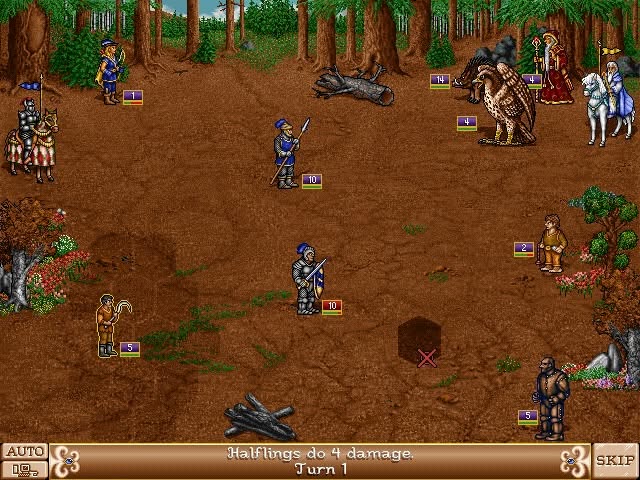
Another notable addition is the HP Bar option during battles. Once enabled, it displays health bars for all monsters on the battlefield, giving players a clearer overview of combat without having to inspect individual creatures.
HP Bar option
The graphical interface has also received some attention. A new Marketplace icon and counter, complete with a popup dialog, have been introduced. This feature helps players better understand exchange rates at Marketplaces and Trading Posts while providing a clearer visual presentation of the available information.
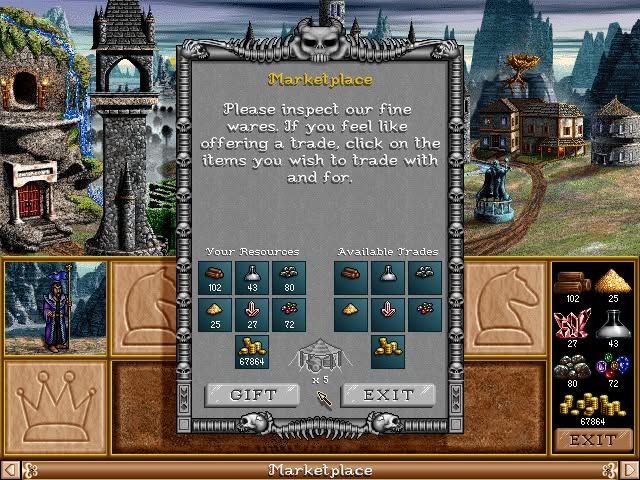
Marketplace icon and counter
The Map Editor has also received several improvements. The Auto Playtest feature has been reworked and expanded, allowing map makers to select which hero classes are used during gameplay testing. The developers plan to expand this dialog further in future releases, with the goal of turning it into a comprehensive map-testing tool.
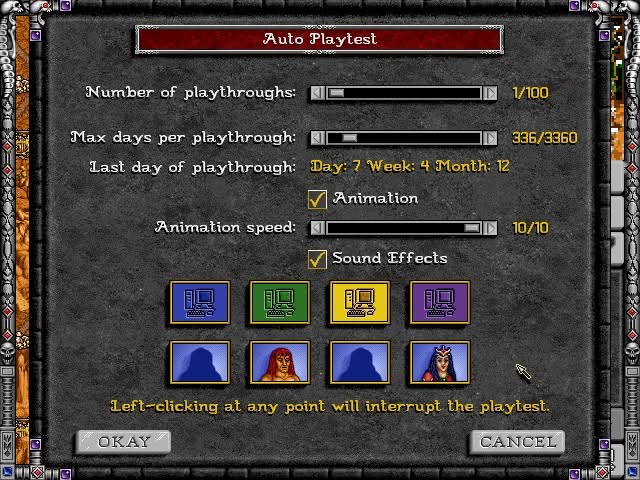
Auto Playtest feature
Map makers will also appreciate the addition of multiline text editing in the Editor’s Virtual Keyboard, making it much easier to add storylines and longer descriptions to their maps.
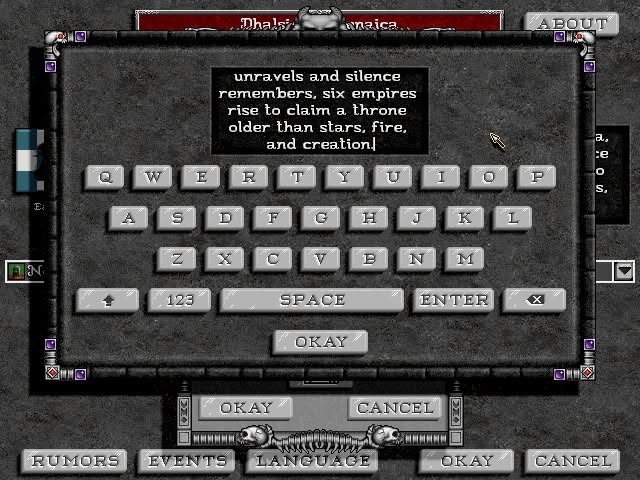
Virtual Keyboard
The Hotkey dialog has received a complete makeover as well. It now includes category selection, making it easier to discover available hotkeys for specific dialogs and areas of the game. A configurable Delete hotkey has also been added, improving usability across different operating systems and hardware configurations.
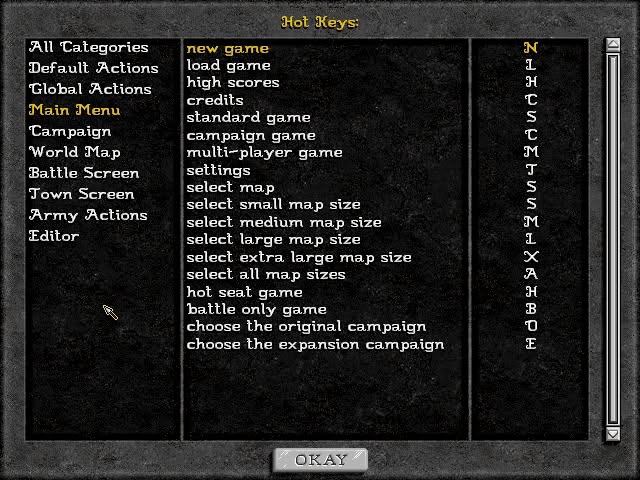
Hotkey dialog
Five new maps have been added, while four existing maps have been updated with corrections provided by their respective creators. The developers are continuing to expand the collection, so even more maps can be expected in future releases.
In addition to these major changes, the team has updated several translations, fixed various UI issues, added new functionality to dialogs, and implemented many other improvements. In total, more than 60 issues have been resolved since the previous release.
The developers have also announced their return to a monthly release schedule. The extended delay was not intentional and was caused by important personal circumstances affecting several core team members. These issues have now been resolved, and the project continues to move forward with more updates on the way.
The next release is expected much sooner, bringing several particularly interesting improvements!
Fheroes engine v1.1.18 full changelog:
– add “Eternal Winter” map to the fheroes2 bundle
– add a dedicated hotkey for item deletion
– add marketplace icon and counter to the dialogs
– update Victory and Loss conditions while switching languages in the Editor
– update the bundled “Apocalypse” map to 3.9
– add multiline text editing support to the Virtual Keyboard
– add HP bar option for monsters during battles
– add “Dhalsivia Pirenaica” map into the fheroes2 bundle
– do not let the AI cast Berserker when the target’s nearest unit is not an enemy
– resize the hotkey dialog width based on the current resolution
– fix an assertion being hit while re-running Auto Playtest
– update the Swedish translation
– remove the confusing “Rate” value in the diplomacy dialog
– update the Brazilian Portuguese translation
– add category filtering for hotkeys in settings window
– add small improvements to the High Scores dialog
– fix an extra frame being rendered while clicking on the Save Game button
– rework Auto-playtest dialog
– add extra logic to prevent AI heroes from visiting shrines if they have all spells
– improve the Summon Boat spell description
– make sure the AI doesn’t value the 3rd level shrine higher than everything
– update the Hungarian translation
– hide Editor’s system message if the game’s language has been changed
– reduce perks the AI gets on higher difficulties
– use the forced Software Cursor Emulation state for touchscreen and gamepad systems
– fix adventure non-action objects being set as fort
– adapt campaign’s difficulty dialog per language
– update the Russian translation
– fix transparent pixels in empty movement and mana bars
– update the Czech translation
– improve the Bloodlust spell description
– make the Campaign Difficulty Names More Accurate
– disable “Sound Effects” in the Auto-playtest window if animation is off
– add “Tetra Conflict” v1.2 map into the fheroes2 bundle
– allow placing heroes on water
– add “Utopeia” map to the fheroes2 bundle
– add “Good Titans, Bad Titans” map to the fheroes2 bundle
– explicitly state that an object was moved in the Editor
– update the bundled “Final Invasion” map to version 8.1
– update the bundled “Ravenhold” map to version 1.9
– update the bundled “Eruption” map to version 3.2
– fix incorrect offset for evil empty button
– fix an empty army for the surrendered hero
– update the Spanish translation
– make all buttons in the Main Menu and Editor Menu engine-generated for German game resources
– fix invalid ranges of spell occurrence in Mage Guild
– use the in-engine image scaling type according to the scaling type option
– fix rendering delay after closing Auto Playtesting window
– add Lost Temple (1.1.17) to the fheroes2 bundle
– fix subpixel resize on bottom and right borders and near-transparent pixels
– allow to quit the application at any time by closing the application window
– prevent an assertion hit while loading a Resurrection map
– speed up rendering on PS Vita
– add neutral monster limit growth on original maps
– generate all buttons for Editor’s File Option dialog
– make the “Visions” spell and the “Crystal Ball” artifact much more user-friendly and useful
– update “New Game” button popup for the Editor
– do not do extra rendering for the same radar position on the popup window
– allow the use of the mouse wheel to navigate through the Magic Book
– make AI heroes future predict more objects
– do not predict future object value for AI heroes on Easy difficulty
– fix the castle’s well’s “Available” text position for some languages
– fix an invalid assertion for battle troops
– improve battle logic so Ghosts and Vampire Lords utilize their unique abilities
Heroes III Griffin shield badge in stock

WoG Folder – All HoMM mods in one place