How to solve: Cannot create Random_Map.H3M in data directory
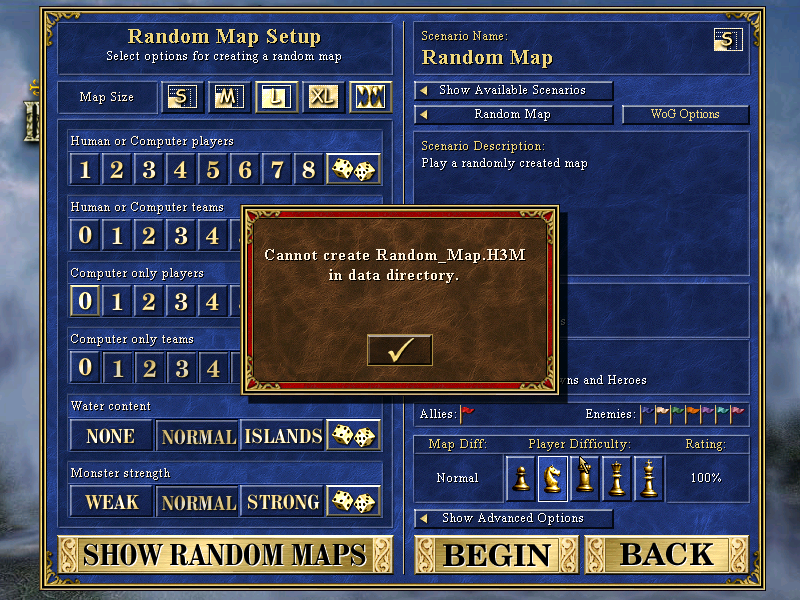
I received this error message with the new version of ERA 2.8.3 when i wanted to create Random map. Don’t panic, it’s very easy to fix it.
Just create a folder with the name “random_maps” in the game directory. Done.

Heroes III Griffin shield badge in stock

WoG Folder – All HoMM mods in one place


Hi, I am having the same problem but it seems i already have a folder called ‘random_maps’
When i go into the random_maps folder it shows attempts to start the selected map (1kb).
I have HOTA installed too. I am on Windows.
Any help would be greatly appreciated!
Hi, so the game is giving you this message “Cannot create Random_map.H3M in data directory”? What version of HotA do you have installed?
Check if your game is installed in Program Files, if so, it shouldn’t be. Do a fresh install somewhere else on the disk.
Not quite, It says ‘Could not create a random map with the current choices’
Thought it may have something to do with the new HOTA faction but Even when I do random for everything it gives me the same message.
I have HOTA version 1.8.0 installed.
I have HOMM3 + HOTA installed in a different folder, not program files.
Thanks in advance!
The issue you’re describing is not related to the game installation, but to random map generation.
You’re most likely trying to generate a map using a predefined template and have changed the number of players or map size.
For example, the Clash of Dragons template is designed for 2 players and a maximum map size of XL. If you select this template and then change the number of players to 4, or the map size to Gigantic, the game will display exactly this error message.
Ok great, thank you for your time!
For any case I want to leave here the other solution of such problem. I am running Hota/HMM through Wineskin (under macOS) and I see the same error. In my case `random_maps` folder was created but I have found (use `opensnoop` utility) that HMM application trying to create random map file name with invalid encoding (looks like it try to use Russian letters in file name). To fix this problem I change locale to `ru_RU.UTF-8` (in `WineSkin/Advanced Options/Custom Commands` I set `export LANG=ru_RU.UTF-8` value) and solved this problem.
U are the best
Hey, dude. Can you show me this feature, please? I’m also with Mac Os
Hello,
My game crashes when I start the WoG.
Failed to read data at 0.
EIP: H3era.00600480 (A0_DrawMouseCursor_sub_600430 + 80). Code: C0000005