Temple Texture Pack – HoMM: Olden Era
Temple Texture Pack replaces diffuse textures for the core Temple basic units using CAM – Custom Assets Mod, without touching resources.assets or any original game files.
| Platform | Olden Era |
| Requires | BepInEx |
| File Size | 21 MB |
| Updated | 20.05.2026 |
| Version | 1.01 |
| Authors | Hellmanor |
| Status | active |
| Download (official, nexus mods ) | |
| works only with HoMM: Olden Era | |
| ⚙️WoG Folder is online source of HoMM mods I’ve discovered over the past decade. It’s regularly updated, and all mods are neatly organized. The WoG Folder also contains various goodies like the “Did you know?“ series, artworks, manuals, meme collections, and more. | |
What This Pack Change
For now it’s [WIP] and available models are for basic units.
- Swordsman – improved base armor via swordsman_common_diffuse.
- Crossbowman – updated body and weapon colors:
crossbowman_body_color (default with blue accent instead of green),
crossbowman_body_color_1 (white/blue variant),
crossbowman_weaopon_color for the weapon. - Griffin – refreshed look using Griffin_common_diffuse.
- Lightweaver – two versions of the V1 model:
lightweaver_V1_diffuse_ (main),
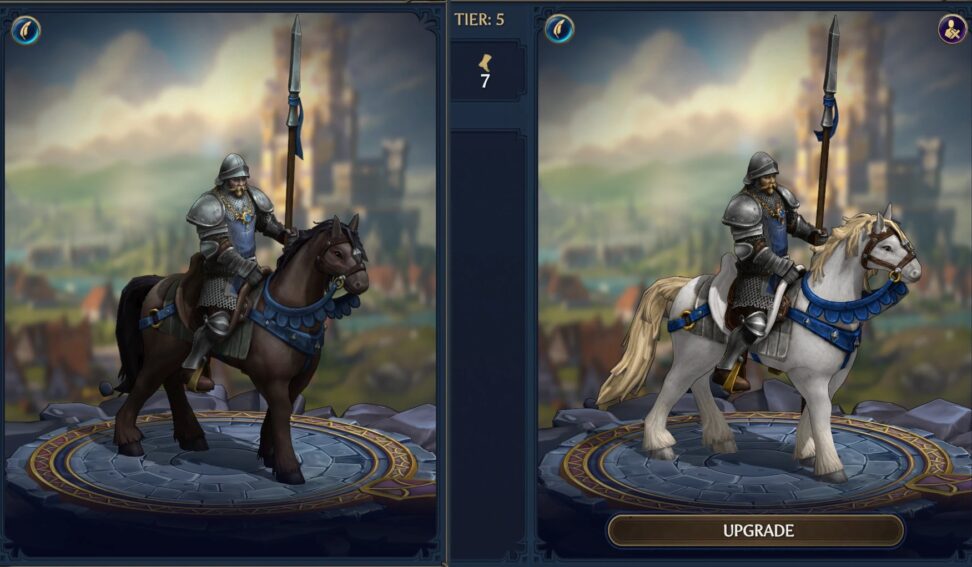
lightweaver_V1_diffuse_0 (alternative golden skin). - Cavalry (rider + mount) – updated rider (sunlight_cavalery_default_diffuse) and horse:
Temple-sunlight_cavalery_horse_default_diffuse (default),
Temple-sunlight_cavalery_horse_default_diffuse_1 (alternative white horse model). - Inquisitor – new diffuse map via inquisitor_diffuse
- Angel – new diffuse texture via angel_diffuse
weapon set in weapons_diffuse, with weapons_diffuse_1 as an optional alternative shield closer to the original design.
Requirements
- BepInEx 6 IL2CPP
- CAM – Custom Assets Mod
Installation
- Copy this texture pack into your game folder:
- Custom Assets folder: place in [GAME FOLDER]/BepInEx/plugins/
- config folder: place in [GAME FOLDER]/BepInEx/
- Launch the game
Texture Variants
Several units have alternative variants bundled in this pack. Only one variant from each group should be enabled at a time in:
BepInEx/config/mods.hellmanor.customassetsmod.assets.cfg
Example configuration:
[AssetFiles]
Texture2D/crossbowman_body_color.png = true
Texture2D/crossbowman_body_color_1.png = falseTexture2D/lightweaver_V1_diffuse_1.png = true
Texture2D/lightweaver_V1_diffuse_0.png = falseTexture2D/Temple-sunlight_cavalery_horse_default_diffuse.png = true
Texture2D/Temple-sunlight_cavalery_horse_default_diffuse_1.png = falseTexture2D/weapons_diffuse.png = true
Texture2D/weapons_diffuse_1.png = false
After changing variant selection, if it’s not automatically change, press F6 in-game to reload assets.
Troubleshooting
- Texture does not change – check that the file is in the correct CAM subfolder (Packs), the file name matches the Unity asset name exactly, and that it is = true in the assets config, then press F6.
- Variant not applied – ensure only one variant in the group is set to = true; CAM will ignore disabled entries when reloading.
Heroes III Griffin shield badge in stock

WoG Folder – All HoMM mods in one place