Heroes 3: Statistics Mod download
| Platform | ERA Project |
| File Size | 2 MB |
| Updated | 23.09.2026 |
| Version | 0.3 |
| Authors | PerryR |
| Status | active |
| Download (alternative, WoG Folder) | |
| or install/update this mod via Heroes Launcher | |
| Heroes 3 Complete GOG version (works only with this version) | |
| ⚙️WoG Folder is online source of HoMM mods I’ve discovered over the past decade. It’s regularly updated, and all mods are neatly organized. The WoG Folder also contains various goodies like the “Did you know?“ series, artworks, manuals, meme collections, and more. | |
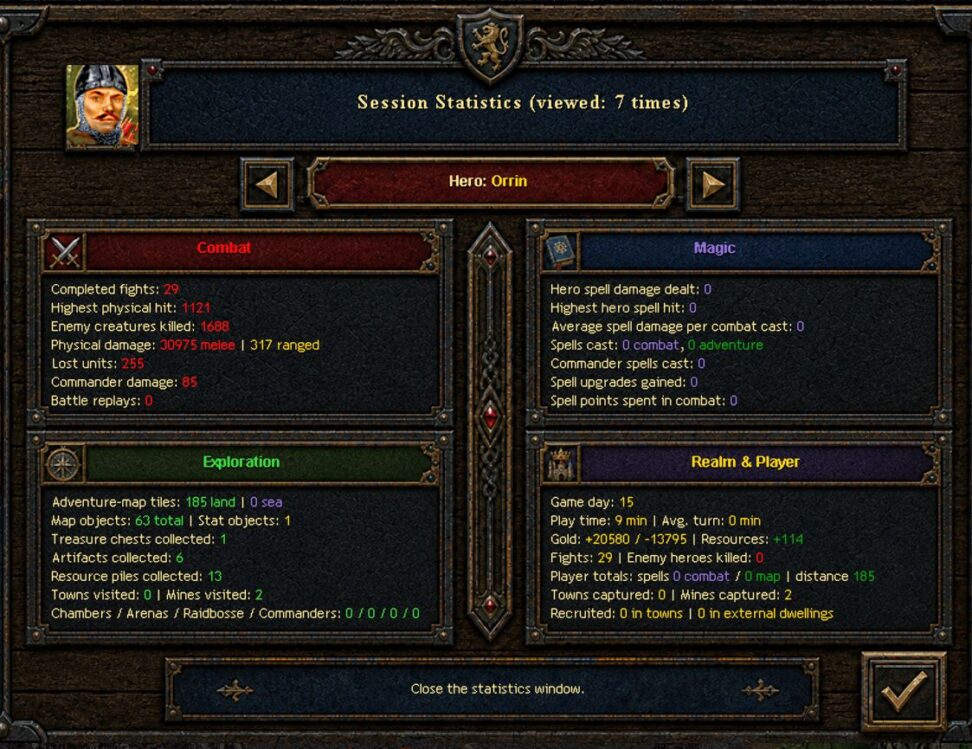
Statistics Mod records combat, magic, exploration, economy, and realm statistics throughout the current Heroes of Might and Magic III map. Hero records and player-wide totals are stored in the savegame and remain available after loading. Version 0.3 introduces the four-panel Session Statistics window and substantially expands the first prototype.
The mod reads compatible counters from Advanced Classes Mod, Arena Mod, Raid Boss Mod, and Battle Commander scripts when those mods are active.
Combat
- completed fights;
- killed enemy creatures;
- melee, ranged, and commander damage;
- highest physical hit;
- units permanently lost in completed battles;
- battle replays started with the hero;
Magic
- direct hero spell damage and highest spell hit;
- average damage per combat spell cast;
- combat and adventure-map spells;
- commander spells;
- spell points spent in combat;
- spell upgrades earned when Advanced Classes Mod is active.
Exploration
- travelled land and sea tiles;
- unique map objects and primary-stat objects visited;
- treasure chests, artifacts, and resource piles collected;
- towns and mines visited;
- completed creature-bank chambers, Arenas, Raid Bosses, and Battle Commander encounters when the corresponding mods provide these values.
Realm & Player
- current map day, active play time, and average turn duration;
- recorded gold income, gold expenses, and collected resources;
- player-wide fights and defeated enemy heroes;
- total spell activity and travelled distance;
- captured towns and mines;
- creatures recruited from town dwellings, including the WoG and HD Mod Buy All functions, and separately from external adventure-map dwellings.
Opening the window
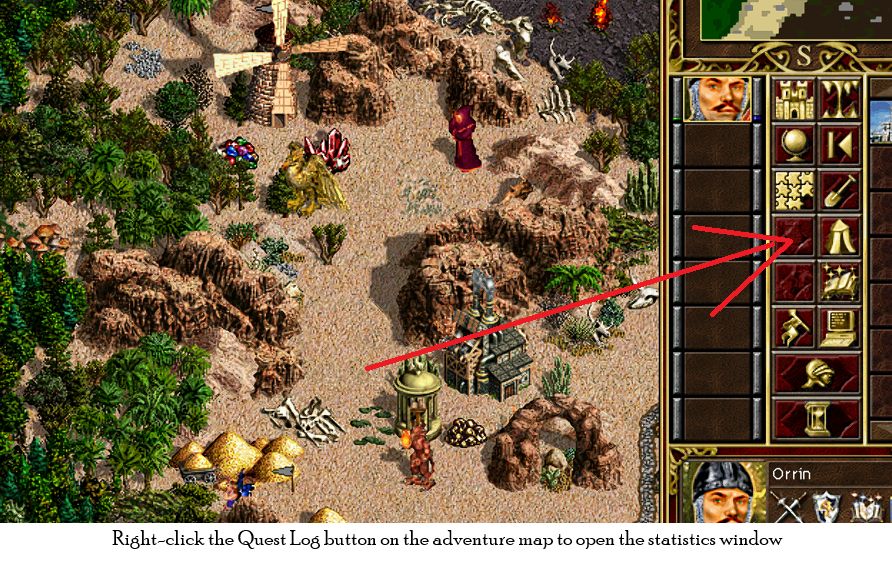
Right-click the Quest Log button on the adventure map to open the statistics window. Alternatively, hold Shift and right-click an empty adventure-map tile. Use the arrow buttons beside the hero name to browse all heroes owned by the current player. Hover over headings, values, controls, and the hero portrait for short explanations. Close the window with the checkmark or Esc.
Heroes III Griffin shield badge in stock

WoG Folder – All HoMM mods in one place