Enhanced Highlights – HoMM: Olden Era
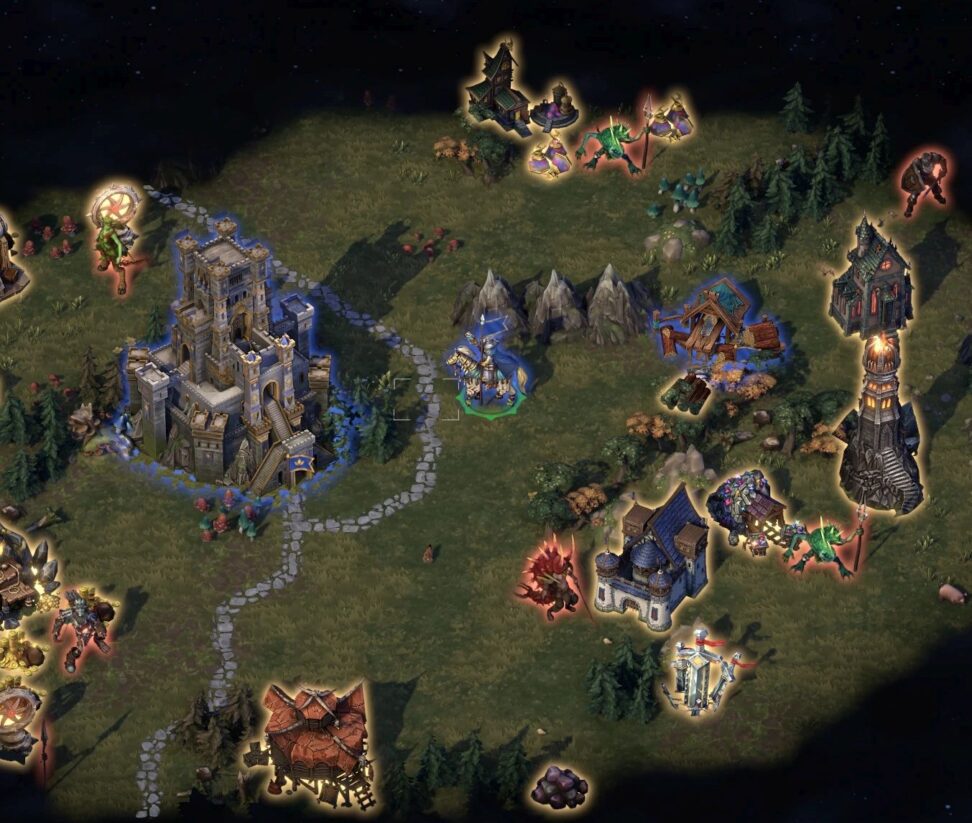
By default, the game highlights map objects with the same standard color when holding Left Alt. With this mod, all objects are still highlighted normally, but objects controlled by a player are highlighted using that player’s flag color.
| Platform | Olden Era |
| Requires | BepInEx |
| File Size | 1 MB |
| Updated | 11.06.2026 |
| Version | 1.1 |
| Authors | Hellmanor |
| Status | active |
| Download (official, Nexus mods) | |
| buy HoMM: Olden Era on Steam (works only with this version) | |
| ⚙️WoG Folder is online source of HoMM mods I’ve discovered over the past decade. It’s regularly updated, and all mods are neatly organized. The WoG Folder also contains various goodies like the “Did you know?“ series, artworks, manuals, meme collections, and more. | |
The mod also adds floating colored faction symbols above player-owned objects, making controlled dwellings and other owned map objects easier to spot at a glance.

Installation
- Install BepInEx 6 IL2CPP into your Heroes of Might and Magic: Olden Era game folder, where the game executable is located.
- Launch the game once so BepInEx can initialize and generate IL2CPP interop files on first run. This may take a moment.
- Close the game.
- Copy the unpacked plugin into:
Heroes of Might and Magic: Olden Era\BepInEx\plugins - Launch the game and load a map.
Configuration
After the first launch, the config file will be created here:
Heroes of Might and Magic: Olden Era\BepInEx\config\com.hellmanor.enhancedhighlits.cfg
Available options:
- EnableAltHighlights – enables or disables player-colored Left Alt highlighting.
- EnableFloatingSymbols – enables or disables floating player-colored faction symbols above owned objects.
Default settings:
[Features]
EnableAltHighlights = true
EnableFloatingSymbols = true
Compatibility
Built for BepInEx 6 IL2CPP and tested with the IL2CPP version of Heroes of Might and Magic: Olden Era.
The mod only changes visual highlighting and ownership markers on the adventure map. It does not change ownership, object interaction, resources, movement, AI, save data, or gameplay rules.
Troubleshooting
If the mod does not appear to work, make sure:
- BepInEx 6 IL2CPP is installed correctly.
- The mod DLL is inside the folder
BepInEx\plugins - The relevant feature is enabled in the config file.
If owned objects are highlighted correctly but floating symbols do not appear, check that EnableFloatingSymbols is set to true.
If floating symbols appear but ALT highlighting does not change color, check that EnableAltHighlights is set to true.
Heroes III Griffin shield badge in stock

WoG Folder – All HoMM mods in one place